
Merge SSO ID Rajasthan 2026 – How to Combine Duplicate SSO Accounts
Many Rajasthan users accidentally create more than one SSO ID while registering through Jan Aadhaar, mobile number, Google account, or other methods. Having multiple accounts can sometimes create confusion when accessing government services, checking applications, or updating profile information.
The Rajasthan SSO Portal provides options that may help users manage duplicate accounts and keep their information organized. Before making any account changes, it is important to verify which SSO ID is currently active and linked to your services.
Why Do Users End Up With Multiple SSO IDs?
Duplicate SSO accounts are usually created when:
- Different mobile numbers are used during registration
- A user registers through Jan Aadhaar and later creates another account
- Separate accounts are created for personal and official use
- Login details of an older account are forgotten
Basic Process for Managing Duplicate SSO Accounts
- Visit the official Rajasthan SSO portal.
- Sign in using your active account.
- Open the profile or account settings section.
- Review account information carefully.
- Follow the instructions available on the portal for account management.
- Complete any required OTP verification.
- Confirm the changes after checking all details.
Benefits of Merge SSO ID Rajasthan
Many Rajasthan users accidentally create more than one SSO account using different mobile numbers, Jan Aadhaar details or email addresses. Merging accounts helps keep everything under one login.
Benefits of merging SSO IDs:
- Use one account for all Rajasthan services
- Avoid login confusion
- Keep documents and details organized
- Access government portals more easily
- Reduce duplicate account issues
Merge SSO ID Rajasthan Process Step-by-Step
Step 1: Open the Rajasthan SSO Portal
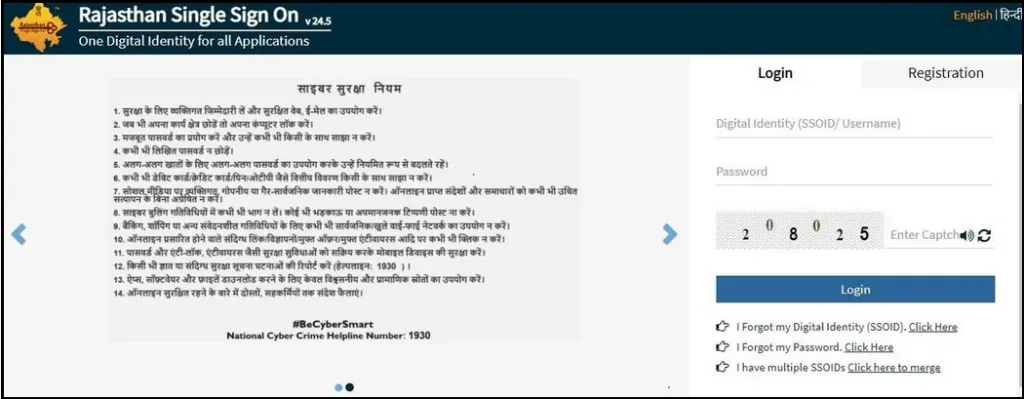
Visit the official Rajasthan Single Sign-On website and log in using your active SSO ID.
Step 2: Login to Your Account
Enter your:
- SSO ID
- Password
- Captcha code
After login, open your profile settings.
Step 3: Go to Edit Profile
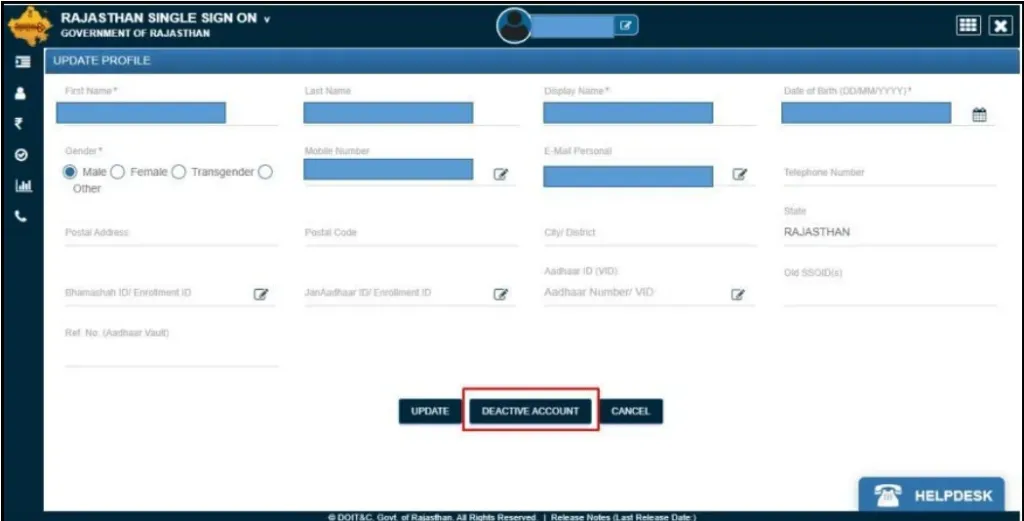
Inside your dashboard, click on the Edit Profile option.
This section allows users to manage account settings and merge duplicate SSO IDs.
Step 4: Select Deactivate Account
If you have multiple SSO IDs, select the account you no longer want to use.
Click the Deactivate Account option.
Step 5: Verify Using OTP
The portal will send an OTP to your registered mobile number.
Enter the OTP to continue the SSO merge process.
Step 6: Enter Active Government SSO ID
Now enter the SSO ID you want to keep active permanently.
This step links both accounts together securely.
Step 7: Confirm SSO ID Merge
Review your details carefully and confirm the request.
Once completed, your duplicate SSO IDs will be merged successfully.
Important Things Before Merge SSO ID Rajasthan
Before starting the process, keep these things ready:
| Requirement | Why It Matters |
|---|---|
| Active Mobile Number | Required for OTP verification |
| Access to Both SSO IDs | Needed during verification |
| Correct Jan Aadhaar Details | Helps avoid profile mismatch |
| Stable Internet Connection | Prevents process interruption |
Common Problems During Merge SSO ID Rajasthan
OTP Not Received
Wait for a few minutes and try again. Also check network signals on your mobile.
Incorrect SSO ID Error
Make sure you enter the correct active SSO ID without extra spaces.
Account Already Linked
Sometimes the portal automatically detects linked accounts. In this case, contact SSO Rajasthan support.
Who Can Use the SSO Merge Feature?
The merge option is useful for:
- Rajasthan citizens
- Government employees
- Students
- Business users
- Users with duplicate SSO accounts
Frequently Asked Questions
Can I merge two SSO IDs into one account?
Yes, Rajasthan SSO allows users to merge duplicate SSO IDs into one active account.
Is OTP required for SSO ID merge?
Yes, mobile OTP verification is required during the process.
What happens after deactivating an SSO ID?
The inactive account gets linked with your main SSO account.
Can government employee SSO IDs be merged?
Yes, eligible government-linked accounts can also be merged.
Final Words
Merging multiple SSO IDs helps users manage Rajasthan government services more smoothly. If you use more than one SSO account, completing the merge process can save time and reduce login issues in the future.
Always use the official Rajasthan SSO portal while performing account-related actions.