
SSO ID Registration Rajasthan 2026 Create Your SSO Account Step by Step
Creating an SSO ID is the first step for accessing Rajasthan government services online. Through a single SSO account, citizens, government employees, and business owners can use multiple government portals without creating separate logins.
This guide explains the SSO ID registration process, required documents, registration methods, and common issues users may face during account creation.
What is SSO ID Registration?
SSO ID Registration is the process of creating a Rajasthan Single Sign-On account. After registration, users can access various government services through one username and password.
Instead of maintaining different accounts for different departments, the SSO system provides a centralized dashboard where services can be managed from one place.
Who Can Register for an SSO ID?
| User Type | Registration Method |
|---|---|
| Citizen | Jan Aadhaar or Aadhaar |
| Government Employee | SIPF ID |
| Business Owner (Udyog) | BRN Number |
Documents Required for SSO ID Registration
Before starting registration, keep the following information ready:
- Jan Aadhaar Number
- Aadhaar Card
- Mobile Number
- Email Address
- SIPF ID (for employees)
- BRN Number (for businesses)
Having these details available can help complete the registration process smoothly.
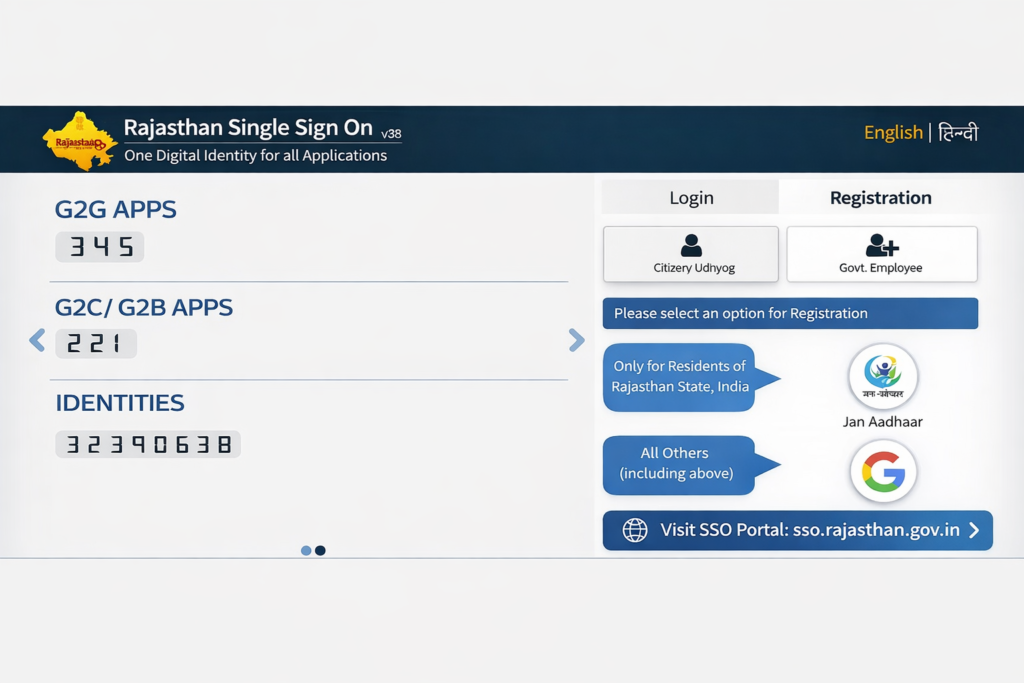
How to Register for SSO ID Rajasthan
Step 1: Open the official Rajasthan SSO portal.
Step 2: Click the Registration option available on the homepage.
Step 3: Select your user category:
- Citizen
- Government Employee
- Udyog (Business)
Step 4: Choose the appropriate registration method.
Step 5: Enter the required information and complete verification.
Step 6: Create a secure password for your account.
Step 7: Submit the registration form.
Step 8: Log in using your newly created SSO ID and password.
Important Security Advice: Always keep your SSO ID and password secure and never share your login details to protect your personal information.
Registration Options for Citizens
Citizens can create an SSO ID using approved identification methods available on the Rajasthan SSO portal.
Common registration options include:
- Jan Aadhaar
- Aadhaar-based registration
- Other methods available on the official portal
The available options may change according to official updates.
Registration for Government Employees
Government employees can register using their SIPF details.
After verification, employees can access department-related services, official resources, and other employee facilities available through the Rajasthan SSO platform.
Registration for Businesses (Udyog)
Business owners can register under the Udyog category.
After successful registration, businesses may access various online services related to registrations, approvals, applications, and other government-related facilities.
Common Registration Issues
OTP Not Received
- Check mobile network coverage.
- Ensure the registered mobile number is active.
- Request a new OTP if necessary.
Verification Failed
- Verify that all entered information is correct.
- Ensure details match official records.
Duplicate Account Error
- Try recovering the existing account instead of creating a new one.
Mobile Number Already Registered
- Use the existing account recovery option.
- Contact official support if needed
Benefits of Creating an SSO ID
- Access multiple government services through one account.
- Manage applications from a single dashboard.
- Reduce the need for separate logins.
- Use online services from mobile or desktop devices.
- Track service requests and applications more easily.
SSO ID Registration – FAQs
What is SSO ID Registration?
SSO ID Registration is the process of creating a single digital account that allows users to access multiple government services through one login on the Rajasthan SSO Portal.
Who can register for an SSO ID?
Residents of Rajasthan, business owners (Udyog), and government employees can register for an SSO ID.
Is SSO ID Registration free?
Yes, SSO ID Registration is completely free of cost. There are no charges for registration.
How long does the registration process take?
The registration process usually takes only a few minutes if all the required details are available.
Can I create more than one SSO ID?
It is recommended to create only one SSO ID per user to avoid duplication and confusion.
What should I do if I forget my SSO ID password?
You can use the “Forgot Password” option on the login page to easily reset your password.
Conclusion
SSO ID Registration helps users access Rajasthan government services through a single digital account. Whether you are a citizen, government employee, or business owner, creating an SSO ID simplifies access to multiple online services from one dashboard. Always use the official Rajasthan SSO portal for registration and account-related activities.