
SSO ID Mobile Number Change Rajasthan 2026 – Easy & Fast Update Guide
SSO ID mobile number change Rajasthan 2026 is a common requirement for users facing OTP and login issues. If your registered mobile number is no longer active or you are not receiving OTP, this step-by-step guide will help you easily update your mobile number through the official SSO portal or eMitra.
In this blog, you will learn how to change mobile number in SSO ID Rajasthan step by step, including the eMitra method and solutions for common issues.
This guide explains SSO Rajasthan mobile number update and how to change mobile number in SSO ID step by step.
Quick Summary SSO ID Mobile Number Change Rajasthan 2026
Task |
Method |
Time Required |
|---|---|---|
|
Change mobile number in SSO ID |
Online via SSO portal |
5–10 minutes |
|
Update mobile number if login not working |
Through eMitra |
10–20 minutes |
|
OTP not received issue |
Network + retry tips |
2–5 minutes |
|
Account recovery |
Forgot password option |
5 minutes |
How to SSO ID Mobile Number Change Rajasthan 2026
Step 1: Open Official SSO Portal
The SSO ID Mobile Number Change Rajasthan 2026 process is simple and can be completed online within a few minutes.
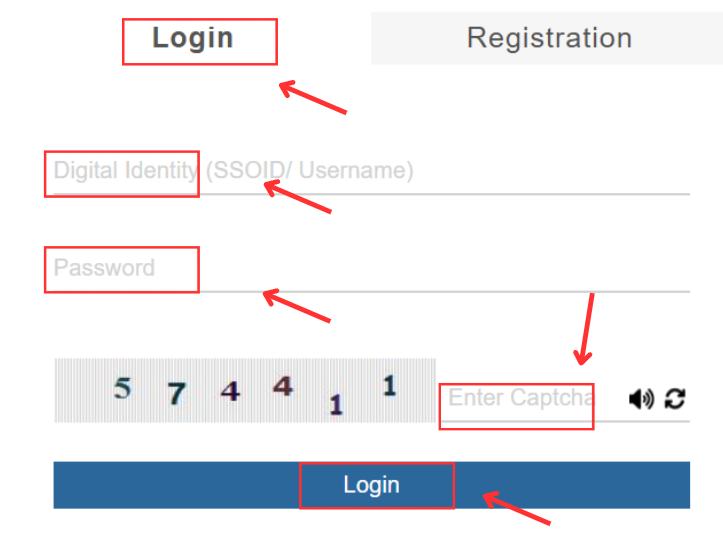
Go to the official SSO Rajasthan website and open the login page.
Step 2: Login to Your SSO ID
Enter:
- SSO ID / Username
- Password
- Captcha
Click Login.
Step 3: Go to Profile Settings
After login, find the Profile or Edit Profile option.
Step 4: Select Mobile Number Update Option
In profile settings, you will see your current registered mobile number.
Click on:
Update Mobile Number / Change Mobile Number
Step 5: Enter Your New Mobile Number
Now enter your new mobile number carefully.
Step 6: OTP Verification
You will receive an OTP on your new number.
Enter OTP and click Verify.
Step 7: Save Changes
After verification, click Save and Submit.
Make sure your new mobile number is active and has network signals before starting the process.
Enter the mobile number carefully because a wrong digit can cause OTP verification failure.
Sometimes OTP may take 1–2 minutes to arrive, so please wait before requesting again.
Avoid clicking the OTP button repeatedly, as it may temporarily block OTP requests.
For best results, use Google Chrome on a laptop PC instead of a mobile browser.
Method 2: Change Mobile Number Through eMitra (If You Cannot Login)
If you forgot your password or your old number is inactive, you can visit the nearest eMitra center.
Required documents for eMitra:
- Aadhaar card
- Jan Aadhaar card (if available)
- SSO ID details
- New mobile number
If you cannot login, the SSO ID Mobile Number Change Rajasthan 2026 can also be done through eMitra centers.
📌 This method is best for users facing account locked or OTP issues.
Common Mistakes While Updating Mobile Number in SSO ID
Many users face problems because of small mistakes. Avoid these common errors:
- Entering an incorrect mobile number by mistake
- Requesting OTP multiple times within a short time
- Using an outdated browser or slow internet connection
- Not clearing cache and cookies
- Trying to update mobile number when the SSO portal is under maintenance
Quick Tip: If the SSO portal is not working properly, try again during non-peak hours (late night or early morning). Many users get faster OTP delivery at that time.
Common Problems & Solutions (SSOID Mobile Number Change 2026 Update)
Problem 1: OTP Not Received
Many users face issues during SSO ID Mobile Number Change Rajasthan 2026, especially related to OTP verification.
Solution:
- Check network signals
- Restart mobile phone
- Try after 10 minutes
- Do not request OTP repeatedly
- Use another SIM slot if available
Problem 2: Mobile Number Change Option Not Showing
Solution:
- Update your profile first
- Clear browser cache
- Try Chrome browser
- Login from desktop/laptop
Problem 3: SSO ID Login Not Working
Solution:
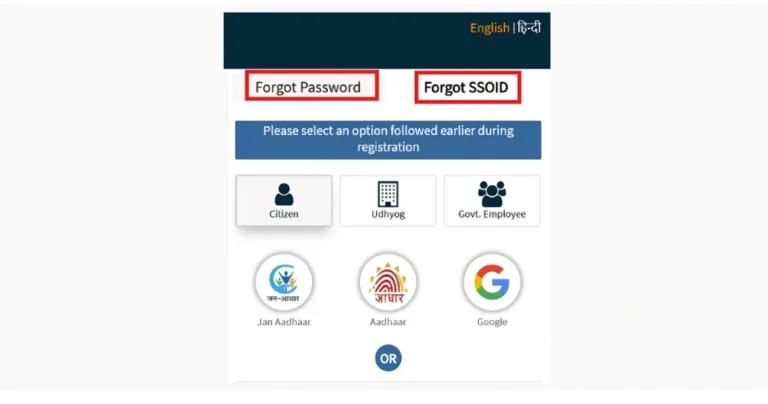
Use Forgot Password
option Reset password through OTP email
Visit eMitra if old number is inactive
Problem 4: Account Locked Issue
Solution:
- Wait 30 minutes and try again
- Reset password
- Contact SSO helpline or eMitra
Important Tips Before Updating Your Number
Always use your own active number
Do not share OTP with anyone
Update email ID for backup recovery
Save your SSO ID and password in a safe place
Enable profile verification if available
FAQs – SSO ID Mobile Number Change Rajasthan 2026
1. Can I change mobile number in SSO ID online?
Yes, you can update your mobile number online through your SSO profile settings.
2. What if my old mobile number is not active?
If your old number is inactive, you should visit the nearest eMitra center for mobile number update.
3. How long does SSO mobile number update take?
Online method takes around 5–10 minutes. eMitra method may take 10–20 minutes.
4. Is OTP required to change mobile number in SSO Rajasthan?
OTP may not arrive due to network issues, server load, or incorrect mobile number. Wait for a few minutes and try again.
5. What should I do if OTP is not coming?
Wait for some time, check network and retry. If the issue continues, contact support or visit eMitra.
Conclusion
This complete guide on SSO ID Mobile Number Change Rajasthan 2026 helps you update your number easily and fix OTP or login issues without confusion.
Updating your registered mobile number in SSO ID Rajasthan 2026 is important for OTP verification and account security. If you can login, you can easily update it through profile settings. If your old number is inactive, visiting the nearest eMitra center is the best option.This guide on SSO ID Mobile Number Change Rajasthan 2026 helps you update your number quickly.
If you face any issue during the process you can check our other SSO guides on ssoidtr.com.